Switch without starting over

TV Time import with continuity you can trust

Novaria helps you move your TV Time history and keep tracking immediately. Continue with movies, TV shows, and anime in one place, discover with TMDb metadata, and keep your watch routine private and streaming-neutral.

Why migration feels risky

People stay in old trackers longer than they want because migration feels like a data gamble. Years of episode logs, movie completions, and curated lists represent real effort. If switching means rebuilding manually, most users postpone the move indefinitely. Even when the current app no longer fits daily needs, fear of losing continuity wins. A practical migration path must preserve history so users can improve their workflow without sacrificing past work.

Another common concern is data trust after import. Users worry that mismatched titles, duplicate records, or incomplete seasons will make the new tracker unreliable from day one. When confidence is low, adoption stalls because nobody wants to second-guess every entry. Migration should include clear post-import cleanup options so your library can be verified, adjusted, and aligned with your actual watch habits quickly.

Mixed-format viewing adds complexity. Many users track TV series, movies, and anime simultaneously, and they need all three to remain connected after migration. If imported data lands in fragmented sections or inconsistent states, planning becomes harder than before. A successful move should unify formats under one status model so your next decisions are easier, not more confusing.

Finally, users often want a cleaner product philosophy after migration: privacy-first, practical tracking, and no streaming lock-in. Switching tools is not only about interface changes; it is also about regaining control over attention and planning. If the destination app still behaves like an engagement feed, migration does not solve the core problem. People need continuity plus a better long-term experience.

How Novaria handles TV Time import

Novaria supports TV Time import workflows designed to preserve useful history and reduce switching friction. The goal is continuity: keep your progress records, then continue tracking without interruption. After import, you can inspect entries and resolve edge cases so the final library reflects reality. This balance between automation and user control makes migration feel trustworthy rather than opaque.

Once your data is in Novaria, everything is managed through a unified system for movies, TV, and anime. Shared statuses and filters simplify cleanup and ongoing maintenance. You can quickly identify active series, archived titles, and incomplete lists, then organize them into a structure that supports everyday decisions. Instead of inheriting old clutter, you gain a cleaner foundation.

Discovery remains strong after migration because Novaria uses TMDb metadata for context-rich browsing. That means your imported history can immediately inform better next picks without requiring extra apps or manual research. You can review genres, release timing, and related information while staying inside one coherent tracking flow. Discovery becomes a practical continuation of your migrated dataset.

Novaria is privacy-first and intentionally not a streaming platform. This keeps migration outcomes stable because your tracker is not trying to pull you into playback behavior. You watch wherever you prefer while Novaria remains the independent source of truth for history and planning. For users leaving TV Time, this separation often feels like the biggest quality-of-life upgrade.

Benefits of importing into Novaria

Continuity without manual rebuild

TV Time import preserves prior effort so you can continue from real progress instead of recreating years of entries. This lowers switching anxiety and makes adoption practical even for long-term tracker users.

Cleaner post-import organization

Unified statuses help you quickly review imported records, correct mismatches, and remove duplicates. Your library becomes easier to trust, which is critical for maintaining consistent tracking habits after migration.

One system for all formats

Movies, TV shows, and anime live in the same model, reducing fragmentation inherited from older workflows. Cross-format planning becomes simpler and more realistic for everyday viewing decisions.

TMDb-powered discovery context

Rich metadata makes imported history immediately useful for future picks. You can explore with genre and release signals while keeping decisions aligned with your existing taste profile.

Privacy-first environment

Novaria centers personal utility over engagement noise. After migration, you gain a calmer product experience that supports long-term tracking consistency and keeps attention on practical actions.

No streaming dependency

Because Novaria is not a streaming app, your tracking data remains independent of playback ecosystems. This neutral position protects flexibility and keeps your watch history portable across services.

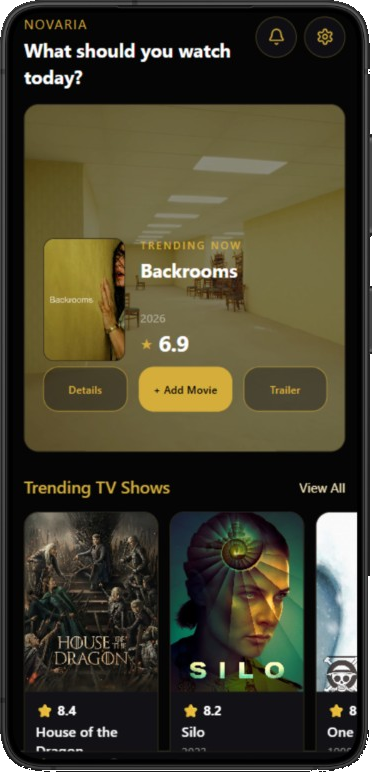
After import: cleaner tracking home

Novaria home screen with imported watch history
Bring your TV Time history, organize quickly, and keep moving without reset.

TV Time import questions

Can I really move my TV Time history into Novaria?

Yes. Novaria provides TV Time import workflows aimed at preserving your historical tracking data so you can continue without starting over. After importing, you can review and adjust entries as needed. This combination of migration and cleanup keeps the transition practical and trustworthy.

What happens if some imported titles are mismatched?

Post-import review tools and organization workflows help reconcile mismatches. You can correct statuses, handle duplicates, and align records with your real viewing history. The goal is to produce a clean, dependable library rather than forcing you to accept an untouched import output.

Does TV Time import include movies, shows, and anime?

Novaria is built to track all three formats, and migration is designed to support continuity across your broader watch habits where relevant data exists. Once imported, content types are managed in one coherent model, making planning easier than juggling separate tools and inconsistent states.

Will discovery still work well after migration?

Yes. Novaria uses TMDb metadata for discovery, so imported history can immediately support better recommendations and shortlist decisions. You keep context-rich browsing while maintaining your own tracking structure. This helps migration feel like an upgrade, not just a data transfer.

Is Novaria a streaming app after I import?

No. Novaria remains a dedicated tracking and discovery companion. You continue watching on your preferred services while Novaria stores progress and planning. This neutral model avoids streaming lock-in and keeps your data centered on personal utility.

Why is privacy important during migration?

Migration involves personal history, and users want confidence their tracking remains focused on their own goals. Novaria's privacy-first direction supports that expectation by emphasizing practical organization over noisy engagement features, helping you maintain control before and after the switch.

FAQ

Do I need to re-enter watched episodes manually?

In most cases, no. TV Time import workflows are designed to carry over existing records so manual rebuilding is minimized. You can then review and fine-tune only where necessary.

Can I import and keep using Novaria right away?

Yes. After migration, you can continue tracking immediately while cleaning any edge cases in parallel. This allows a smooth transition without interrupting your normal viewing routine.

Will imported data affect discovery quality?

Usually in a positive way. Historical context helps Novaria's TMDb-based discovery feel more relevant to your habits, making shortlist creation faster and more intentional.

Is Novaria only for former TV Time users?

No. Novaria works well for new trackers too. TV Time import simply provides a migration bridge for users who already have established history elsewhere.

Can I keep my privacy after switching?

Yes. Novaria is privacy-first and focused on personal utility, helping you track consistently without feed-heavy social pressure or streaming engagement loops.

What if I want to migrate later, not today?

You can start tracking in Novaria now and import when ready, depending on your workflow. The key point is that migration options remain available where relevant, so you keep flexibility.

Move your history with confidence

Import TV Time data into Novaria and continue tracking in a cleaner, privacy-first environment.

App Store & Google Play — Coming Soon